The Best Anti-Virus for Windows 10 & 11: Why You Don’t Need to Pay a Single Cent for Third-Party Security
July 24, 2026
Hey everyone, this is Paul from Pegasun! Today we’re going to cover what the BEST FREE Anti-Virus is for Windows 7, 10, and 11. We’ll dive into whether you actually need an antivirus, if third-party options like Avast, AVG, or Avira are necessary, whether you should ever pay for premium security subscriptions, and if security tools will slow down your PC.
Let's get right to the point: In my opinion, the BEST FREE Anti-Virus for you is the BUILT-IN WINDOWS DEFENDER. It’s not just me—if you search online or check communities like Reddit, the general consensus is that it works great and is more than good enough for 99% of people. It’s what I’ve personally used for years, and as the go-to tech support for my friends and family, it’s what they all use too with zero issues.
This is my honest opinion. I’m not sponsored by Microsoft or the Windows Defender team (in fact, Microsoft probably isn't too fond of me given all the privacy tweaks we recommend!). But credit where credit is due—their built-in antivirus software is outstanding.
Is Windows Defender Really Good Enough?
Years ago, Windows Defender wasn't great. Its detection rates were poor. But over time, Microsoft invested heavily into security, and today, Defender is exceptional—frequently beating out expensive paid alternatives.
If you're skeptical about taking advice from someone on the internet, that’s great! You should always do your own research. When evaluating antivirus software, I rely on independent benchmark testing from two reputable cybersecurity labs:
These organizations put top antivirus programs side-by-side to test detection rates (including zero-day malware attacks), false positives, and total performance impact on your PC.
What Do the Independent Benchmarks Say?
Looking at testing data from AV-Test, Microsoft Windows Defender consistently earns 100% scores in zero-day malware attack prevention and widespread malware detection. The only minor tradeoff noted in tests is a slight performance drop strictly during the installation of brand-new software. But ask yourself: how often are you installing new software, and does a few extra seconds during installation matter when you get top-tier, lightweight protection for free?
Similarly, in real-world protection tests from AV-Comparatives, Windows Defender blocked 99.7% of threats with 0 false positives. In many tests, Defender scored higher than paid solutions like Malwarebytes, ESET, and Avira, while matching popular tools like Avast and AVG.
So if you are already receiving top-tier protection out-of-the-box, why go out of your way to download third-party software—much less pay an annual subscription for it?
What About a Firewall?
You don't need to buy a firewall either! Windows comes equipped with Windows Defender Firewall right out of the box. It actively monitors network traffic, stops unauthorized access, and protects your home network without requiring annoying configuration setups.
How to Make Sure Windows Defender is Turned On and Active
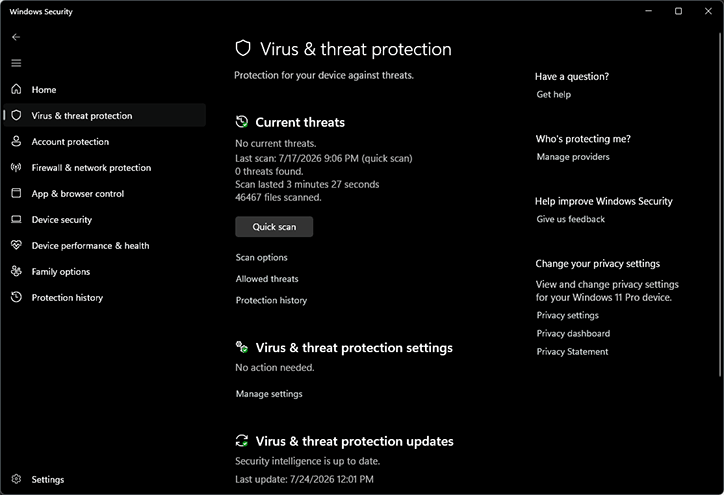
When you uninstall any third-party antivirus, Windows usually turns Defender on automatically. However, it's always a good idea to verify that your protection is active. Here is how to quickly check:
- Open your Start Menu and search for Windows Security, then press Enter.
- In the dashboard, check Virus & threat protection and Firewall & network protection. Both should show a green checkmark indicating "No actions needed."
- If either option displays a warning, click on it and select Turn on or Enable.
- Click on Virus & threat protection updates inside the menu and hit Check for updates to guarantee your threat definitions are completely up to date.
The Hidden Risks of Third-Party Security Tools
Why do I actively advise against installing third-party antivirus software? Because nothing in tech is truly free. Installing third-party software often means trusting yet another company with your private data.
In early 2020, major news outlets reported that popular consumer antivirus providers (such as Avast and AVG) were caught harvesting and selling their users' web browsing history and online activity. It's ironic that a security tool meant to keep you safe was quietly collecting and monetizing your web behavior.
While Microsoft collects system diagnostics by default in Windows, using Windows Defender does not cause any additional data collection beyond what the operating system already handles. You aren't giving up additional privacy just by relying on Defender.
Fine-Tune Your Windows Performance with Pegasun
While Windows Defender takes care of your security, Pegasun System Utilities takes care of your computer's speed. We built Pegasun System Utilities over a decade of fine-tuning to make slow computers run as fast as possible.
With Pegasun System Utilities, you get:
- Faster web browsing, smoother video playback, and better gaming frame rates.
- Extended laptop battery life and cooler CPU running temperatures.
- A completely FREE version that performs essential system cleaning, startup optimization, and speed fixes.
Our catch? If you love how much faster your PC runs with the free edition, you can upgrade to our Premium tier to unlock our advanced Windows 10/11 Optimizer, Bloatware Remover, and Turbo Mode for maximum power during heavy workloads.
Ditch the paid antivirus subscriptions, stick with Windows Defender, and let Pegasun keep your system running like brand new!
Optimize Your Windows PC Today!
Use System Utilities (FREE + Portable) to MAXIMIZE the performance of your Windows 10/11 PC: https://pegasun.com/system-utilities
If you enjoyed this guide, please remember to like, subscribe, and share it to help others save money and keep their PCs fast!